Showing posts with label java. Show all posts
Showing posts with label java. Show all posts
Thursday, April 11, 2013
Package by features
A must-read about how to divide your Java application into packages that are modular and highly cohesive:
http://www.javapractices.com/topic/TopicAction.do?Id=205


Thursday, February 7, 2013
Solution for jQuery plugin conflicts in Wicket
While I was working on a web application based on Wicket, I noticed that jQuery was not functioning in a way I expected. Using FireBug I noticed that a method call to a jQuery plugin failed, because it couldn't find the method. The HTML code I used in the <head>-element looks like this:
  <script type="text/javascript" src="js/jquery-1.7.1.min.js"></script>
  <script type="text/javascript" src="js/jquery-plugin.js"></script>
  <script type="text/javascript">

    function callbackToPlugin() {
      return function () {
        $('#plugin').callToPlugin();
      };
    }

  </script>
The code-fragment includes the jQuery file and the custom plugin file. A function is defined below that returns a callback function that calls the plugin. The code in a Wicket web page class, decides if this callback is used or not. In the code below, the call is rendered in the <head>-element, when the boolean variable "callPlugin" is true.
  @Override
  public void renderHead(IHeaderResponse response) {
    if (callPlugin) {
      response.render(
        OnDomReadyHeaderItem.forScript("$(document).ready(callbackToPlugin())"));
    }
  }
The problem with this code is that Wicket includes its embedded jQuery file in the HTML output automatically, when it detects certain JavaScript function provided by Wicket is used. In this case it includes the jQuery file AFTER the definition of the callback function. What happens is that the definition of the plugin method "callToPlugin" is lost, because the second inclusion of jQuery resets the "$" jQuery variable. This will make our call fail.
The easiest solution I found is to assign another variable to jQuery using the "jQuery.noConflict()" function.
  <script type="text/javascript" src="js/jquery-1.7.1.min.js"></script>
  <script type="text/javascript" src="js/jquery-plugin.js"></script>
  <script type="text/javascript">

    var $j = jQuery.noConflict();

    function callbackToPlugin() {
      return function () {
        $j('#plugin').callToPlugin();
      };
    }

    </script>
Now, the jQuery variable is "$j" instead of "$". Make sure you call the correct method from the Wicket page.
  @Override
  public void renderHead(IHeaderResponse response) {
    if (callPlugin) {
      response.render(
        OnDomReadyHeaderItem.forScript("$j(document).ready(callbackToPlugin())"));
    }
  }
If you have a better solution for this, please let me know in the comments.
Monday, November 5, 2012
Login twice in Wicket
Since the last time I upgraded my Wicket application, I noticed I had to login twice to be authenticated in the application. After careful research using the number one research tool (Google), I found the cause of this problem.
The problem is that my login page is stateless. Wicket will create a temporary dummy session for stateless pages, which will not be saved internally in the session store.
The solution is to let the session stick after authentication by calling bind in the session:
@Override
public boolean authenticate(String userName, String password) {
    // Your authentication code here...

    // Only reach this when authenticated...

    if (isTemporary()) {
        bind();
    }
}
Saturday, August 4, 2012
Java Collection Matrix
Looking for a Java Collection class for your project, but don't know which one to use or is available? The link below will take you to a Java Collection Matrix, which lists the summarized properties of the standard Java Collection implementations.
http://www.janeve.me/articles/which-java-collection-to-useThursday, July 26, 2012
Custom Wicket FeedbackPanel markup
I had to add custom static markup to the Wickets FeedBackPanel for a project I'm currently working on. The markup has to be visible only when the the feedback panel itself is visible. The easiest way to do this is to extend the original class, and provide a corresponding HTML file with the custom markup.
package com.javaeenotes;

import org.apache.wicket.feedback.IFeedbackMessageFilter;
import org.apache.wicket.markup.html.panel.FeedbackPanel;


public class ErrorPanel extends FeedbackPanel {
    private static final long serialVersionUID = 1L;


    public ErrorPanel(String id, IFeedbackMessageFilter filter) {
        super(id, filter);
    }


    public ErrorPanel(String id) {
        super(id);
    }
}
<wicket:panel>
  <div class="feedbackPanel" wicket:id="feedbackul">
    <b>Error</b>
    <div class="errorlevel" wicket:id="messages">
      <span class="errorlevel" wicket:id="message">A message</span>
    </div>
  </div>
</wicket:panel>
The HTML file is basically the same as the original file. I added an error header as an example.
Wednesday, May 2, 2012
Configurable, and modular Java classes using Annotations and Enumerations
In todays blog post, I'm showing how I implemented highly configurable, and modular classes with the help of annotations, and enumerations. From now on, let's call these modular classes "modules". Let's suppose we have the following architectural problem:
- There is a need for modules that are highly configurable.
- The modules implement the same interface.
- The configuration parameters vary.
- Some configuration parameters are required.
- Some configuration parameters have a default value.
- A configuration parameter should have an explanation for the enduser.
- It should also be easy to add new modules.
UML Class Diagram

ModuleFactory and ModuleFactoryImpl
The module factory is responsible for creating a configured module. It takes the class name, and Properties object as parameters. I'm using a class name here instead of a class type, because the list of supported modules are stored in the database as names. The Properties object contains the configuration for the module to be created.
ModuleType
This enumeration is basically a list of supported types by the factory. When a new module is implemented, it should be added to this enumeration, otherwise the factory doesn't know how to translate the class name to the actual class. I tried to find a way to avoid the need of this enumeration, like searching in the class path for classes that correspond to the name. Unfortunately, this is too complex to achieve without adding a lot of boilerplate code. If you find a better way to solve this problem, please let me know in the comments.
Module
This interface formalizes the methods implemented by all modules. Their parameters are defined in an enumeration of type ModuleParameter. Every module should have a corresponding ModuleParameter enumeration. An example implementation for this demo is called "ExampleModule", and it uses "ExampleModuleParameter" to define its configuration.
ModuleParameter
This interface specifies the required methods for every subclass enumeration implementation. The enumeration is basically a list of configuration parameters for a module. Per configuration parameter, it also defines: if the parameter is required, the default value, and a brief explanation. An example implementaton for this demo is called "ExampleModuleParameter", and it has two configuration parameters.
The Implementation
ModuleParameter
package com.javaeenotes.modules;


// This interface enforces required methods for the parameter enumerator.
public interface ModuleParameter {

    boolean isRequired();

    String getDefaultValue();

    String getExplanation();
}
This interface defines the methods used to retrieve the properties of the configuration parameter.
ExampleModuleParameter
package com.javaeenotes.modules;


// This enum class contains the parameters used to configure a module.
public enum ExampleModuleParameter implements ModuleParameter {
    PARAM1("param1", true, "DEFAULT", "This is parameter 1."),
    PARAM2("param2", false, null, "This is parameter 2.");

    // Code below is boiler plate code. It is not possible to move the
    // code to an abstract class, because enumerators are not allowed
    // to extend classes.

    private final String name;
    private final boolean isRequired;
    private final String defaultValue;
    private final String explanation;


    private ExampleModuleParameter(
            String name,
            boolean isRequired,
            String defaultValue,
            String explanation) {

        this.name = name;
        this.isRequired = isRequired;
        this.defaultValue = defaultValue;
        this.explanation = explanation;
    }


    @Override
    public String toString() {
        return name;
    }


    @Override
    public boolean isRequired() {
        return isRequired;
    }


    @Override
    public String getDefaultValue() {
        return defaultValue;
    }


    @Override
    public String getExplanation() {
        return explanation;
    }
}
Everything you should know about the specific parameters is defined here, and nowhere else (high cohesion)! It forces the developer who is adding new parameters to define the extra properties as required.
I tried to eliminate the boiler plate code, by moving them to a shared abstract enumeration class, but that is not possible. Now we have to copy the same code for every new "ModuleParameter" implementation. Is there a better solution for this?
Module
package com.javaeenotes.modules;


public interface Module {
    void doBusinessStuff();
}
Just the interface of a module, containing a common method.
ExampleModule
package com.javaeenotes.modules;


// Annotate this module with parameter class that contains the
// configurable parameters for this module.
@ParameterClass(parameterClass = ExampleModuleParameter.class)
public class ExampleModule implements Module {

    private String param1;
    private String param2;


    @Override
    public void doBusinessStuff() {
        System.out.println("Hello, I am "
                + this.getClass().getSimpleName()
                + ". I am configured with param1='" + param1
                + "', and param2='" + param2 + "'.");
    }


    public void setParam1(String param1) {
        this.param1 = param1;
    }


    public void setParam2(String param2) {
        this.param2 = param2;
    }
}
This is an example implementation of a module. As you can see, it's just a POJO, making it very easy to write new ones. The class is linked to its parameter class using the annotation placed just before the class definition. The attributes and setters are important here. The names must correspond with the names defined in the parameter class.
ParameterClass
package com.javaeenotes.modules;

import java.lang.annotation.ElementType;
import java.lang.annotation.Retention;
import java.lang.annotation.RetentionPolicy;
import java.lang.annotation.Target;


// Only usable on classes.
@Target(ElementType.TYPE)
// Annotation must be available during runtime.
@Retention(RetentionPolicy.RUNTIME)
public @interface ParameterClass {
    Class<? extends ModuleParameter> parameterClass();
}
This is the annotation, which links the module to its parameter class. The factory uses this annotation to find out which configuration values to set.
ModuleType
package com.javaeenotes.modules;


// This is basically a list of supported modules by the factory.
public enum ModuleType {
    EXAMPLE_MODULE(ExampleModule.class);

    private Class<? extends Module> moduleClass;


    private ModuleType(Class<? extends Module> moduleClass) {
        this.moduleClass = moduleClass;
    }


    public Class<? extends Module> getModuleClass() {
        return moduleClass;
    }
}
This enumeration is a list of supported modules. The purpose of this enumeration is to map the name to its class type. This information is required by the module factory to instantiate the correct module class.
ModuleFactory
package com.javaeenotes.modules;

import java.util.Properties;


public interface ModuleFactory {
    Module getModule(String moduleName, Properties configuration)
            throws Exception;
}
The interface of the module factory. It requires the class name, and a "Properties" object containing the configuration of the module.
ModuleFactoryImpl
package com.javaeenotes.modules;

import java.lang.reflect.Method;
import java.util.HashMap;
import java.util.Map;
import java.util.Properties;


public class ModuleFactoryImpl implements ModuleFactory {

    private Map<String, ModuleType> nameToModuleType;


    public ModuleFactoryImpl() {
        // The Map contains all the supported module types.
        nameToModuleType = new HashMap<String, ModuleType>();

        for (ModuleType moduleType : ModuleType.values()) {
            nameToModuleType.put(
                    moduleType.getModuleClass().getSimpleName(),
                    moduleType);
        }
    }


    @Override
    public Module getModule(String moduleName, Properties configuration)
            throws Exception {

        if (nameToModuleType.containsKey(moduleName)) {
            ModuleType moduleType = nameToModuleType.get(moduleName);
            Module module = moduleType.getModuleClass().newInstance();
            configureModule(module, configuration);
            return module;
        }

        throw new IllegalArgumentException(
                "Class not supported: " + moduleName);
    }


    private void configureModule(
            Module module, Properties configuration)
            throws Exception {

        if (module.getClass().isAnnotationPresent(ParameterClass.class)) {
            Map<String, Method> methodNameToMethod =
                    getMethodNameToMethod(module);

            for (ModuleParameter param : getModuleParameters(module)) {
                String configValue = configuration.getProperty(
                        param.toString());

                // Set default value if configuration value is empty.
                if (configValue.isEmpty()) {
                    configValue = param.getDefaultValue();
                }

                // Check if value is required.
                if ((configValue == null || configValue.isEmpty())
                        && param.isRequired()) {

                    throw new IllegalArgumentException(
                            "Configuration value missing for: "
                            + param.toString());
                }

                // Set configuration value in module.
                invokeParameterSetter(methodNameToMethod, module,
                        param.toString(), configValue);
            }
        }
    }


    private Map<String, Method> getMethodNameToMethod(Module module) {
        Map<String, Method> methodNameToMethod =
                new HashMap<String, Method>();

        for (Method method : module.getClass().getMethods()) {
            methodNameToMethod.put(method.getName(), method);
        }

        return methodNameToMethod;
    }


    private ModuleParameter[] getModuleParameters(Module module) {
        return module.getClass()
                .getAnnotation(ParameterClass.class)
                .parameterClass().getEnumConstants();
    }


    private void invokeParameterSetter(
            Map<String, Method> methodNameToMethod,
            Module module, String paramName, String configValue)
            throws Exception {

        String setterMethodName = getSetterMethodName(paramName);

        if (methodNameToMethod.containsKey(setterMethodName)) {
            methodNameToMethod.get(setterMethodName).invoke(
                    module, configValue);
        } else {
            throw new IllegalArgumentException(
                    "No setter found for: " + paramName);
        }
    }


    private String getSetterMethodName(String paramName) {
        return "set" + Character.toUpperCase(paramName.charAt(0))
                + paramName.substring(1);
    }
}
Using the name of the module class, this factory instantiates the correct class with the help of the "ModuleType" enumeration class. Then it tries to find out if this module requires configuration, by detecting the annotation. The annotation specifies the use of the "ExampleModuleParameter" enumeration for configuration. Using the enumeration, and the "Properties" object, it calls the setters with the configuration values. It also checks if a required configuration value is present. The result is a module with all required configuration values set.
A drawback is that the method name of the setters is restricted. It must be the same as the name of the parameter (excluding the "set" string), which is defined in the enumeration. A solution for this is to use annotations in the setter method definition to specify which configuration parameter it corresponds to. Using string literals to tie things together makes the code brittle.
Main
package com.javaeenotes.modules;

import java.util.Properties;


public class Main {
    public static void main(String[] args) {
        // Build the configuration properties.
        Properties configuration = new Properties();
        configuration.setProperty(
                ExampleModuleParameter.PARAM1.toString(), "");
        configuration.setProperty(
                ExampleModuleParameter.PARAM2.toString(), "param2");

        try {
            // Get instance of configured module from factory.
            Module module = new ModuleFactoryImpl()
                .getModule("ExampleModule", configuration);

            // Run the module.
            module.doBusinessStuff();
        } catch (Exception e) {
            e.printStackTrace();
        }
    }
}
This class demonstrates the whole solution. If run, it prints: Hello, I am ExampleModule. I am configured with param1='DEFAULT', and param2='param2'.
Conclusion
As you can see, writing new modules is very easy by implementing just the two interfaces. All the configuration code is centralized in the factory implementation.
If you have ideas for improvements or better solutions, please don't hesitate to share them in the comments.
Monday, December 26, 2011
Annotated callback methods in custom class
We're implementing a simple message service framework to demonstrate how we can implement a framework that uses annotations, like JAX-WS. Using annotations minimizes boilerplate code, and promotes high cohesion of classes. It also promotes decoupling, because it prevents forcing the use of framework classes on clients as much as possible.
The messaging framework has one interface with a register method, which is used to register custom objects that handle incoming messages. The framework does not know what the type is of this object. It uses the reflection API to check for annotated methods, which tell the messaging framework to call these methods when a message has to be handled.
The message service framework supports two types of messages, which we define in as an enum type in MessageType.java:
package com.javaeenotes;


public enum MessageType {
    NORMAL,
    URGENT
}
The interface of the message service framework has a method to register custom client objects that will handle incoming messages. The second method of the interface is only included, so we can send messages through this framework. The interface of the message service framework is defined in MessageService.java:
package com.javaeenotes;


public interface MessageService {
    void registerMessageHandler(Object object);

    void sendMessage(String message, MessageType messageType)
        throws Exception;
}
Now, we define our annotation. This annotation can be used by the client application to mark methods that will handle incoming messages generated by the message service framework. It also has a message type enum parameter, so the framework will only call this method if the type of the message matches the specified type parameter. The annotation is defined in MessageMethod.java:
package com.javaeenotes;


import java.lang.annotation.ElementType;
import java.lang.annotation.Retention;
import java.lang.annotation.RetentionPolicy;
import java.lang.annotation.Target;


// Only usable on methods.
@Target(ElementType.METHOD)
// Annotation must be available during runtime.
@Retention(RetentionPolicy.RUNTIME)
public @interface MessageMethod {
    MessageType messageType() default MessageType.NORMAL;
}
A client object will use the annotation to mark callback methods for specified message types. The example client handler has one method for both message types. An example client message handler class for this demo is defined as ExampleMessageHandler.java:
package com.javaeenotes;


public class ExampleMessageHandler {
    @MessageMethod(messageType = MessageType.NORMAL)
    public void handleNormalMessage(String message) {
        System.out.print("NORMAL MESSAGE: " + message + "\n");
    }


    @MessageMethod(messageType = MessageType.URGENT)
    public void handleUrgentMessage(String message) {
        System.out.println("URGENT MESSAGE: " + message + "\n");
    }
}
The most important class of this tutorial is: MessageServiceImpl.java, which you can find below. This is the implementation of our message service framework interface. This class is responsible for determining callback methods provided by the client, and call them when messages arrive.
package com.javaeenotes;


import java.lang.reflect.Method;


public class MessageServiceImpl implements MessageService {
    private Object messageHandler;


    @Override
    public void registerMessageHandler(Object messageHandlerObject) {
        messageHandler = messageHandlerObject;
    }


    @Override
    public void sendMessage(String message, MessageType messageType)
            throws Exception {

        for (Method method : messageHandler.getClass().getMethods()) {
            if (method.isAnnotationPresent(MessageMethod.class)) {
                MessageMethod messageMethod
                    = method.getAnnotation(MessageMethod.class);

                if (messageMethod.messageType() == MessageType.NORMAL
                        && messageType == MessageType.NORMAL) {

                    method.invoke(messageHandler, message);
                } else if (messageMethod.messageType()
                        == MessageType.URGENT
                        && messageType == MessageType.URGENT) {

                    method.invoke(messageHandler, message);
                }
            }
        }
    }
}
Now, we only need a Main class to get this demonstration working. The class will create the example client object, and register it in the framework. Then, it will create two example messages, and pass them to the framework, which then will call the annotated callback methods of the example client object. The Main class is defined in: Main.java.
package com.javaeenotes;


public class Main {
    public static void main(String[] args) {
        // Create message service and register message handler.
        MessageService messageService = new MessageServiceImpl();
        messageService.registerMessageHandler(
                new ExampleMessageHandler());

        try {
            // Sending test messages through the message service.
            messageService.sendMessage("This is a normal message.",
                    MessageType.NORMAL);

            messageService.sendMessage("This is an urgent message!",
                    MessageType.URGENT);
        } catch (Exception e) {
            e.printStackTrace();
        }
    }
}
If we run the Main class, we should get the following output:
NORMAL MESSAGE: This is a normal message.
URGENT MESSAGE: This is an urgent message!
Thursday, October 13, 2011
Adding Oracle JDBC driver to Maven 2 repository
I like my library JAR-files to be managed by Maven 2. It makes life much easier. Sadly, due to the binary license there is no public Maven 2 repository with the Oracle JDBC driver. So we have to add the JDBC driver manually to our local Maven 2 repository.
First, download the latest Oracle JDBC driver here: http://www.oracle.com/technetwork/indexes/downloads/index.html. Do a search on "JDBC" to find the correct download link.
If you're using Maven inside Eclipse like I am, the "mvn" command will not work from the command prompt. We have to install Maven 2 on our system. You can download Maven 2 here: http://maven.apache.org/download.html. Simply unzip, and make sure the "bin" directory is in your command path.
Now, we can install the JAR file with the following command:
mvn install:install-file -DgroupId=com.oracle -DartifactId=ojdbc6
  -Dversion=11.2.0.3 -Dpackaging=jar -Dfile=ojdbc6.jar -DgeneratePom=true
Be sure to check the parameters, like the version number.
Finally, we can use the Oracle JDBC driver in our Maven 2 project by adding the following dependency to our "pom.xml" file:
<dependency>
    <groupId>com.oracle</groupId>
    <artifactId>ojdbc6</artifactId>
    <version>11.2.0.3</version>
</dependency>
Friday, September 9, 2011
Inject instances in Quartz jobs with Google Guice
This post explains how to use Quartz 2 with Google Guice. Before you read any further, I assume you have some basic understanding about Guice and Quartz 2, and what problems they solve.
Normally, Quartz will instantiate job classes itself. You only need to supply the job class, so Quartz knows which class to instantiate when a job is ready to be executed. The job itself is pretty hidden (encapsulated) by Quartz.
In some cases, you want to let Google Guice inject references of (singleton) objects to the job. Such as a Data Access Object, so the job can access or store data.
The solution is to supply our own job factory to the Quartz class that is responsible for job instantiation. Our factory will use Guice to create instances for Quartz to use.
package com.javaeenotes.guicequartz;

import org.quartz.Job;
import org.quartz.Scheduler;
import org.quartz.SchedulerException;
import org.quartz.spi.JobFactory;
import org.quartz.spi.TriggerFiredBundle;

import com.google.inject.Inject;
import com.google.inject.Injector;

public class MyJobFactory implements JobFactory {

    @Inject
    private Injector injector;


    @Override
    public Job newJob(TriggerFiredBundle bundle, Scheduler scheduler)
            throws SchedulerException {

        return (Job) injector.getInstance(
            bundle.getJobDetail().getJobClass());
    }
}
To complete this example, we need an example DAO class, and a Quartz job class that will hold the injected DAO object.
package com.javaeenotes;

public interface Dao {
    public abstract String getData();
}
package com.javaeenotes;

import com.google.inject.Singleton;

@Singleton
public class DaoImpl implements Dao {

  @Override
  public String getData() {
    return "Data from DAO.";
  }
}
package com.javaeenotes;

import org.quartz.Job;
import org.quartz.JobExecutionContext;
import org.quartz.JobExecutionException;
import com.google.inject.Inject;

public class MyJob implements Job {

  @Inject
  private Dao dao;


  @Override
  public void execute(JobExecutionContext context)
        throws JobExecutionException {

    System.out.println(dao.getData());
  }
}
Now, we need a Guice module that defines and maps the factory and DAO classes.
package com.javaeenotes;

import org.quartz.spi.JobFactory;
import com.google.inject.AbstractModule;

public class MyModule extends AbstractModule {

  @Override
  protected void configure() {

    bind(JobFactory.class).to(MyJobFactory.class);
    bind(Dao.class).to(DaoImpl.class);
  }
}
Finally, a Main class to demonstrate the application:
package com.javaeenotes;

import org.quartz.JobBuilder;
import org.quartz.JobDetail;
import org.quartz.Scheduler;
import org.quartz.SchedulerException;
import org.quartz.SchedulerFactory;
import org.quartz.SimpleScheduleBuilder;
import org.quartz.Trigger;
import org.quartz.TriggerBuilder;
import org.quartz.impl.StdSchedulerFactory;

import com.google.inject.Guice;
import com.google.inject.Injector;

public class Main {

  public void run() {

    // The Guice injector used to create instances.
    Injector injector = Guice.createInjector(new MyModule());

    // Object that contains the job class.
    JobDetail jobDetail = JobBuilder.newJob(MyJob.class)
            .withIdentity("jobId", "jobGroup").build();

    // Create the trigger that will instantiate and execute the job.
    // Execute the job with a 3 seconds interval.
    Trigger trigger = TriggerBuilder
            .newTrigger()
            .withIdentity("triggerId")
            .withSchedule(
                    SimpleScheduleBuilder.simpleSchedule()
                            .withIntervalInSeconds(3).repeatForever())
            .build();

    try {
      // Retrieve the Quartz scheduler to schedule the job.
      SchedulerFactory schedulerFactory = new StdSchedulerFactory();
      Scheduler scheduler = schedulerFactory.getScheduler();

      // Here we tell the Quartz scheduler to use our factory.
      scheduler.setJobFactory(injector.getInstance(MyJobFactory.class));
      scheduler.scheduleJob(jobDetail, trigger);

      // Start the scheduler.
      scheduler.start();
    } catch (SchedulerException e) {
      e.printStackTrace();
    }

    try {
      Thread.sleep(10000);
    } catch (InterruptedException e) {
      e.printStackTrace();
    }
  }


  public static void main(String[] args) {
    new Main().run();
  }
}
This will output the following every 3 seconds:
Data from DAO.
Installation of Quartz 2 and Google Guice
If you use Maven 2 for your project, you can install both frameworks by simply adding the following configuration to your pom.xml file.org.quartz-scheduler quartz 2.0.2 com.google.inject guice 3.0
Thursday, September 8, 2011
Kick-start Quartz 2 Tutorial
Quartz is a job scheduling framework, which provides a powerful way of executing and controlling scheduled jobs. This tutorial is based on the official tutorial on the main website of Quartz. The goal of this tutorial is to get a kick-start in using Quartz. Most details are left out. The example is designed to be easy to follow.
The example consists of three classes:
- Main: instantiates, and initiates Quartz classes
- JobTask: the actual job definition
- JobTaskListener: a listener class that monitors the execution of the job
package com.javaeenotes;

import java.io.Serializable;

public class JobContext implements Serializable {

  private static final long serialVersionUID = 1L;

  private String state = "Initial state.";


  public String getState() {
    synchronized (state) {
       return state;
    }
  }


  public void setState(String state) {
    synchronized (state) {
      this.state = state;
    }
  }
}
The next code is the job definition class, which implements the method called by the Quartz scheduler. It's recommended to wrap the whole body of the method in a try-block in order to catch any exceptions that might occur. Wrap the exception in the checked JobExecutionException before throwing it. The main thread can deal with the exception later.
package com.javaeenotes;

import java.util.Date;

import org.quartz.DisallowConcurrentExecution;
import org.quartz.Job;
import org.quartz.JobExecutionContext;
import org.quartz.JobExecutionException;

// Disallow running multiple jobs based on this class at the same time.
@DisallowConcurrentExecution
public class JobTask implements Job {

  @Override
  public void execute(JobExecutionContext executionContext)
          throws JobExecutionException {

    // It's a good idea to wrap the entire body in a try-block, in order to
    // catch every exception thrown.
    try {
      // Retrieve the state object.
      JobContext jobContext = (JobContext) executionContext
            .getJobDetail().getJobDataMap().get("jobContext");

      // Update state.
      jobContext.setState(new Date().toString());

      // This is just a simulation of something going wrong.
     int number = 0;
     number = 123 / number;
    } catch (Exception e) {
      throw new JobExecutionException(e);
    }
  }
}
The next class is responsible for monitoring the job. It's also responsible for dealing with exceptions thrown by the job.
package com.javaeenotes;

import org.quartz.JobExecutionContext;
import org.quartz.JobExecutionException;
import org.quartz.JobListener;

public class JobTaskListener implements JobListener {

  public static final String TRIGGER_NAME = "Trigger";

  @Override
  public String getName() {

    return TRIGGER_NAME;
  }

  @Override
  public void jobToBeExecuted(JobExecutionContext context) {

    System.out.println("Job is going to be executed: "
            + context.getJobDetail().getKey().toString());
  }

  @Override
  public void jobExecutionVetoed(JobExecutionContext context) {

    System.out.println("Job is vetoed by trigger: "
            + context.getJobDetail().getKey().toString());
  }

  @Override
  public void jobWasExecuted(
        JobExecutionContext context,
        JobExecutionException jobException) {

    System.out.println("Exception thrown by: "
            + context.getJobDetail().getKey().toString()
            + " Exception: "
            + jobException.getMessage());
  }
}
Now, we can use these classes to see how it runs. We use the Main-class for this purpose.
package com.javaeenotes;

import org.quartz.JobBuilder;
import org.quartz.JobDataMap;
import org.quartz.JobDetail;
import org.quartz.JobKey;
import org.quartz.JobListener;
import org.quartz.Scheduler;
import org.quartz.SchedulerException;
import org.quartz.SchedulerFactory;
import org.quartz.SimpleScheduleBuilder;
import org.quartz.Trigger;
import org.quartz.TriggerBuilder;
import org.quartz.impl.StdSchedulerFactory;
import org.quartz.impl.matchers.KeyMatcher;

public class Main {

  @SuppressWarnings("unchecked")
  public void run() {

    // The state of the job.
    JobContext jobContext = new JobContext();

    // The value or transfer object provided by Quartz that contains the
    // state of the job. Save it in JobDetail or Trigger.
    JobDataMap jobDataMap = new JobDataMap();
    jobDataMap.put("jobContext", jobContext);

    // Create an identifier for the job.
    JobKey jobKey = new JobKey("jobId", "jobGroup");

    // Object that contains the job class and transfer object.
    JobDetail jobDetail = JobBuilder.newJob(JobTask.class)
            .withIdentity(jobKey).usingJobData(jobDataMap).build();

    // Create the trigger that will instantiate and execute the job.
    // Execute the job with a 5 seconds interval.
    Trigger trigger = TriggerBuilder
            .newTrigger()
            .withIdentity("triggerId")
            .withSchedule(
                    SimpleScheduleBuilder.simpleSchedule()
                            .withIntervalInSeconds(5).repeatForever())
            .build();

    // Setup a listener for the job.
    JobListener jobListener = new JobTaskListener();

    // Use the Quartz scheduler to schedule the job.
    try {
      SchedulerFactory schedulerFactory = new StdSchedulerFactory();
      Scheduler scheduler = schedulerFactory.getScheduler();
      scheduler.scheduleJob(jobDetail, trigger);

      // Tell scheduler to listen for jobs with a particular key.
      scheduler.getListenerManager().addJobListener(
              jobListener,
              KeyMatcher.keyEquals(jobKey));

      // Start the scheduler after 5 seconds.
      scheduler.startDelayed(5);
    } catch (SchedulerException e) {
      e.printStackTrace();
    }

    // Print the job state with a 3 seconds interval.
    while (true) {
      try {
        System.out.println(jobContext.getState());
        Thread.sleep(3000);
      } catch (InterruptedException e) {
        e.printStackTrace();
      }
    }
  }

  public static void main(String[] args) {
    new Main().run();
  }
}
The first thing we do is to create the state object, and wrap it in the transfer or value object provided by Quartz. The reason we do this, is because Quartz doesn't let us instantiate the job class ourselves.
The next step is to define and instantiate a JobKey object, which acts as the identifier for our job. This is also used together with the listener to tell the scheduler which jobs we want to monitor.
Then we create a JobDetail object, which contains details of the job. A trigger object is also needed to tell the scheduler when we want our job to be run. This provides a nice separation of the job and run schedule. Using multiple triggers we can run the same job at different times.
Next, we instantiate the listener class.
Finally, we retrieve an instance of the Quartz scheduler to schedule the job with the trigger. The listener class is also added, together with a matcher based on the job identifier. This way, the scheduler knows which jobs the listener is listening to. The scheduler is then started with a delay of 5 seconds.
The resulting output, when we run the Main class:
Initial state.
Initial state.
Job is going to be executed: jobGroup.jobId
Exception thrown by: jobGroup.jobId
    Exception: java.lang.ArithmeticException: / by zero
Job is going to be executed: jobGroup.jobId
Exception thrown by: jobGroup.jobId
    Exception: java.lang.ArithmeticException: / by zero
Thu Sep 08 18:07:03 CEST 2011
Thu Sep 08 18:07:03 CEST 2011
Job is going to be executed: jobGroup.jobId
Exception thrown by: jobGroup.jobId
    Exception: java.lang.ArithmeticException: / by zero
Quartz installation for Maven 2
To add Quartz to a Maven 2 project, just add the following code to your pom.xml file.org.quartz-scheduler quartz 2.0.2
Friday, August 26, 2011
A stoppable Thread in Java
I am currently working on an application that has multiple different threads running. The threads are running loops and cannot be stopped using interrupts, because a clean up method has to run after the thread stops.
Because I don't want to implement the same code for all these thread classes, I created an abstract subclass of the Thread class. The new class provides the following new functionality to its subclasses:
- Automatically call start up method when started
- Automatically call a method in an endless loop
- A way to stop the thread
- Automatically call clean up method when stopped
package com.javaeenotes;

public abstract class AbstractStoppableThread extends Thread {

    private volatile boolean stopThread = false;

    @Override
    public final void run() {
        startUp();

        while (!stopThread) {
            runInLoop();
        }
        cleanUp();
    }

    public void stopThread() {
        stopThread = true;
    }

    protected void startUp() {
        ;
    }

    protected abstract void runInLoop();

    protected void cleanUp() {
        ;
    }
}
A subclass of this class has to provide the actual overriding implementations of the last three methods. A class that demonstrates the use of the abstract class is shown next:
package com.javaeenotes;

public class ExampleThread extends AbstractStoppableThread {

    @Override
    protected void startUp() {
        System.out.println("Thread started!");
    }

    @Override
    protected void runInLoop() {
        try {
            Thread.sleep(2000);
        } catch (InterruptedException e) {
            ;
        }

        System.out.println("Running in a loop!");
    }

    @Override
    protected void cleanUp() {
        System.out.println("Cleaning up resources!");
    }

    public static void main(String[] args) {
        ExampleThread exampleThread = new ExampleThread();
        exampleThread.start();

        try {
            Thread.sleep(10000);
            exampleThread.stopThread();
        } catch (InterruptedException e) {
            e.printStackTrace();
        }
    }
}
When the example is class is run, the program will output the following:
Thread started!
Running in a loop!
Running in a loop!
Running in a loop!
Running in a loop!
Running in a loop!
Cleaning up resources!
Other interesting links about stopping threads:
Wednesday, July 6, 2011
Restarting a Java application programmatically
I found an interesting article through DZone (excellent site) about how to start a Java application programmatically. The original article can be found on the blog of Leo Lewis. Restarting a Java application is pretty useful for certain applications, where you don't have direct access to the deployment environment.
Here is the orginal link to the article:
http://leolewis.website.org/wordpress/?p=499
Here is the orginal link to the article:
http://leolewis.website.org/wordpress/?p=499
Friday, July 1, 2011
Mocking classes with JMock
Normally, you'll get the following exception when you try to mock a class with jMock:
The solution is to use the ClassImposteriser when instantiating the Mockery class.
Now you can mock any class, just as interfaces. The complete instructions can be found on this web page.
java.lang.IllegalArgumentException:
  com.javaeenotes.YourClass is not an interface.
The solution is to use the ClassImposteriser when instantiating the Mockery class.
context = new Mockery() {
  {
    setImposteriser(ClassImposteriser.INSTANCE);
  }
};
Now you can mock any class, just as interfaces. The complete instructions can be found on this web page.
Tuesday, June 28, 2011
Introduction to Java Concurrency / Multithreading
I came across a nice complete article about Java Concurrency:
Introduction to Java Concurrency / Multithreading
Well written by Jakob Jenkov.
Introduction to Java Concurrency / Multithreading
Well written by Jakob Jenkov.
Sunday, June 5, 2011
Short introduction to jMock
The jUnit framework is a great tool for testing your Java application. But writing test cases can be complex. Especially when the object under test is dependent on several other objects, which in turn depend on other objects. This means the whole dependency graph has to be created before the test can be executed. Building this graph can be complex, and error-prone.
Luckily for us, there exists a framework called jMock. jMock enables you to create mock objects that mimic behavior of dependent objects. We can configure the expected interaction and behavior of these objects.
Let's start with an example class we want to test:
The class is dependent on a class with the following interface:
The interface specifies a method that returns a String. The actual implementation of this interface is not required for jMock. jMock uses the interface to create an object with the same interface you can use in your test cases.
An example test case:
In this test case, we create the object under test with a mock object. The expected interaction and behavior is then configured. First, the method() method is called, which then returns a string value "hello". Other interactions, like calling the same method twice, will result in an error.
As you can see, jMock is a very valuable extension to the jUnit framework, which makes writing test cases much easier.
Links:
Note: when running jMock in Eclipse, the following error can occur when running test cases:
The solution is make sure the jMock libraries are included before the standard jUnit libraries in the build path.
Luckily for us, there exists a framework called jMock. jMock enables you to create mock objects that mimic behavior of dependent objects. We can configure the expected interaction and behavior of these objects.
Let's start with an example class we want to test:
package com.javaeenotes;

public class TestSubject {
    private DependentClassInterface depObject;

    public TestSubject(DependentClassInterface depObject) {
        this.depObject = depObject;
    }

    public String method() {
        return depObject.method();
    }
}
The class is dependent on a class with the following interface:
package com.javaeenotes;

public interface DependentClassInterface {
    public String method();
}
The interface specifies a method that returns a String. The actual implementation of this interface is not required for jMock. jMock uses the interface to create an object with the same interface you can use in your test cases.
An example test case:
package com.javaeenotes;

import static org.junit.Assert.assertTrue;

import org.jmock.Expectations;
import org.jmock.Mockery;
import org.junit.Test;

public class TestSubjectTest {
    @Test
    public void testMethod() {
        Mockery context = new Mockery();
        // Create mock object.
        final DependentClassInterface depObject = context
                .mock(DependentClassInterface.class);

        // Test object is instantiated with mock object.
        TestSubject testSubject = new TestSubject(depObject);

        // Configure expectation and behavior.
        context.checking(new Expectations() {
            {
                oneOf(depObject).method();
                will(returnValue("hello"));
            }
        });

        // Test outcome.
        assertTrue(testSubject.method().equals("hello"));

        // Check if expectations are satisfied.
        context.assertIsSatisfied();

  }
}
In this test case, we create the object under test with a mock object. The expected interaction and behavior is then configured. First, the method() method is called, which then returns a string value "hello". Other interactions, like calling the same method twice, will result in an error.
As you can see, jMock is a very valuable extension to the jUnit framework, which makes writing test cases much easier.
Links:
Note: when running jMock in Eclipse, the following error can occur when running test cases:
java.lang.SecurityException:
  class "org.hamcrest.TypeSafeMatcher"'s signer information
  does not match signer information of other classes in the
  same package
The solution is make sure the jMock libraries are included before the standard jUnit libraries in the build path.
Thursday, May 19, 2011
Free resources associated with web clients
Imagine we have the following problem. Resources are kept open for web clients as long as the clients are using them. When they leave, the resources have to be closed.
Technically, we can say as long as the HttpSession is alive in the web container, the resources are kept open. When the HttpSession is invalidated, we need to call a method that frees the resources.
A solution is to use the HttpSessionBindingListener to solve this problem.
The idea is to create a class that implements this interface. The unbound method contains or refers to the clean-up code. Whenever resources are opened, an instance of this class is created and saved to the corresponding session. When the session invalidates, which can happen by timeout, the web container automatically calls the method of the object in order to free open resources.
The class:
Use the HttpSession.setAttribute() method to save an instance of this class to the session.
Technically, we can say as long as the HttpSession is alive in the web container, the resources are kept open. When the HttpSession is invalidated, we need to call a method that frees the resources.
A solution is to use the HttpSessionBindingListener to solve this problem.
The idea is to create a class that implements this interface. The unbound method contains or refers to the clean-up code. Whenever resources are opened, an instance of this class is created and saved to the corresponding session. When the session invalidates, which can happen by timeout, the web container automatically calls the method of the object in order to free open resources.
The class:
package com.javaeenotes;

import javax.servlet.http.HttpSessionBindingEvent;
import javax.servlet.http.HttpSessionBindingListener;

public class Janitor implements HttpSessionBindingListener {

    public void valueBound(HttpSessionBindingEvent arg0) {
        ;
    }

    public void valueUnbound(HttpSessionBindingEvent arg0) {
        // Start some cleaning here.
    }
}
Use the HttpSession.setAttribute() method to save an instance of this class to the session.
Saturday, May 14, 2011
Creating a Modal Window page with Apache Wicket
This post aims to clarify creating a modal window with Apache Wicket. Before continuing, minimum basic knowledge about Apache Wicket is required. A modal window is a child window on top of the main window. The modal window requires the user to interact with it, before the user can return to the main window.
The application we're developing consists of two pages:
The main page defines and displays the content of a variable and it also has a link to open the modal window page.
The modal window page displays the content of the same variable. But when the modal window is closed, the variable is changed by the modal window page.
Let's start by creating the HTML-file of the main page.
This page defines the modal page with id "modal". The next line is the location where the content of the variable "passValue" is displayed. Finally, a link is defined that opens the modal window.
Next, the corresponding Java class:
The class file displays the content of "passValue" and creates the modal window class with its methods. Look carefully at the code and comments in the modal window methods. We can see that the passValueLabel is expected to change in the window close callback method. We can also see that the variable is actually changed using a setter in the close button callback method. This happens when the user clicks on the close button of the modal window. Finally, an AJAX link is defined and added to the page.
The second part is the modal window page:
The modal page only displays the content of the "passValue" variable. The variable is owned by the main page.
This class is pretty simple. The first parameter refers to the main page that created the modal window page. Go back, and look how the modal window page is constructed in the main page. The main page is casted and the variable is retrieved using the getter-method. The content is then displayed in the modal window page.
Now run the code and the main page will look like this:

After clicking the link, the modal window page is opened:

We can see the same variable is displayed in the modal window page. Now, we close the modal window page. Because of this event, the variable is changed as instructed in the callback code:

As expected, the variable is changed in the main window.
The application we're developing consists of two pages:
- The main page (LaunchPage.java and LaunchPage.html)
- The modal window page (ModalContentPage.java and ModalWContentPage.html)
The main page defines and displays the content of a variable and it also has a link to open the modal window page.
The modal window page displays the content of the same variable. But when the modal window is closed, the variable is changed by the modal window page.
Let's start by creating the HTML-file of the main page.
<html>
<head>
<title>Launch Page</title>
</head>
<body>
<div wicket:id="modal"></div>
<span wicket:id="passValueLabel">Value of passValue variable.</span>
<a wicket:id="showModalLink">Open modal window.</a>
</body>
</html>
This page defines the modal page with id "modal". The next line is the location where the content of the variable "passValue" is displayed. Finally, a link is defined that opens the modal window.
Next, the corresponding Java class:
package com.javaeenotes;

import org.apache.wicket.Page;
import org.apache.wicket.ajax.AjaxRequestTarget;
import org.apache.wicket.ajax.markup.html.AjaxLink;
import org.apache.wicket.extensions.ajax.markup.html.modal.ModalWindow;
import org.apache.wicket.markup.html.WebPage;
import org.apache.wicket.markup.html.basic.Label;
import org.apache.wicket.model.PropertyModel;

public class LaunchPage extends WebPage {

    private String passValue;

    @SuppressWarnings("serial")
    public LaunchPage() {

        passValue = "This value is passed to the modal window.";

        // Display the current content of the passValue variable. The
        // PropertyModel must be used, as the value can be changed.
        final Label passValueLabel;
        add(passValueLabel = new Label("passValueLabel",
                new PropertyModel<String>(this, "passValue")));
        passValueLabel.setOutputMarkupId(true);

        // Create the modal window.
        final ModalWindow modal;
        add(modal = new ModalWindow("modal"));
        modal.setCookieName("modal-1");

        modal.setPageCreator(new ModalWindow.PageCreator() {
            public Page createPage() {
                // Use this constructor to pass a reference of this page.
                return new ModalContentPage(LaunchPage.this.getPageReference(),
                        modal);
            }
        });
        modal.setWindowClosedCallback(new ModalWindow.WindowClosedCallback() {
            public void onClose(AjaxRequestTarget target) {
                // The variable passValue might be changed by the modal window.
                // We need this to update the view of this page.
                target.add(passValueLabel);
            }
        });
        modal.setCloseButtonCallback(new ModalWindow.CloseButtonCallback() {
            public boolean onCloseButtonClicked(AjaxRequestTarget target) {
                // Change the passValue variable when modal window is closed.
                setPassValue("Modal window is closed by user.");
                return true;
            }
        });

        // Add the link that opens the modal window.
        add(new AjaxLink<Void>("showModalLink") {
            @Override
            public void onClick(AjaxRequestTarget target) {
                modal.show(target);
            }
        });
    }

    public String getPassValue() {
        return passValue;
    }

    public void setPassValue(String passValue) {
        this.passValue = passValue;
    }
}
The class file displays the content of "passValue" and creates the modal window class with its methods. Look carefully at the code and comments in the modal window methods. We can see that the passValueLabel is expected to change in the window close callback method. We can also see that the variable is actually changed using a setter in the close button callback method. This happens when the user clicks on the close button of the modal window. Finally, an AJAX link is defined and added to the page.
The second part is the modal window page:
<html>
<head>
<title>Modal Content Page</title>
</head>
<body>
<span wicket:id="passValueLabel">Current content of passValue variable.</span>
</body>
</html>
The modal page only displays the content of the "passValue" variable. The variable is owned by the main page.
package com.javaeenotes;

import org.apache.wicket.PageReference;
import org.apache.wicket.extensions.ajax.markup.html.modal.ModalWindow;
import org.apache.wicket.markup.html.WebPage;
import org.apache.wicket.markup.html.basic.Label;

public class ModalContentPage extends WebPage {

    public ModalContentPage(final PageReference modalWindowPage,
            final ModalWindow window) {

        // Retrieve the passValue content for display.
        String passValue = ((LaunchPage) modalWindowPage.getPage())
                .getPassValue();
        add(new Label("passValueLabel", passValue));

        // You can use the
        // ((LaunchPage)modalWindowPage.getPage()).setPassValue() method to
        // change the passValue variable of the launch/caller page.
    }
}
This class is pretty simple. The first parameter refers to the main page that created the modal window page. Go back, and look how the modal window page is constructed in the main page. The main page is casted and the variable is retrieved using the getter-method. The content is then displayed in the modal window page.
Now run the code and the main page will look like this:

After clicking the link, the modal window page is opened:

We can see the same variable is displayed in the modal window page. Now, we close the modal window page. Because of this event, the variable is changed as instructed in the callback code:

As expected, the variable is changed in the main window.
Thursday, May 12, 2011
Java Practices
A came across a very nice site with a collection of best practices in Java development:
http://www.javapractices.com
Definitely worth a read!
http://www.javapractices.com
Definitely worth a read!
Wednesday, April 20, 2011
Unnecessary Code Detector (UCD)
I'm currently working on a couple of years old Spring-based Java application. The application is developed and extended by multiple developers, which is clearly visible in the code. I'm responsible for a feature change that is going to have a big impact on the code.
An important step before implementing the new feature, is to refactor the relevant parts of the application in order to make the change easier to implement (and more understandable).
I noticed that parts of the code or modules are probably not used anymore. To make the refactoring process easier and more effective, it's probably a good idea to locate and remove dead code. Refactoring dead code is a waste of energy! I've found an Eclipse plugin in the Eclipse Marketplace called Unnecessary Code Detector, which helps me locating dead code.
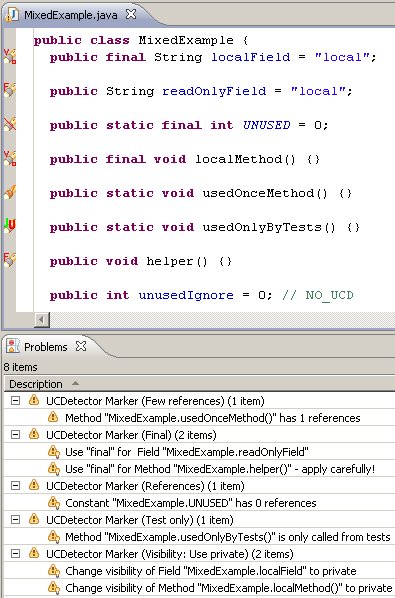
A first run of UCD results in a bunch of markers on code locations, where UCD thinks the code is unused. It also places markers on locations where the "visibility" of variables and methods could be improved.
The tool enables me to quickly find classes and methods with no references. I always do a double check with a "text find" on the whole project, to make sure the code is really not used. Because I'm using Spring, some of the classes are only referenced and used in the XML file. This type of reference is not detected by UCD, and it results in false positives. I annotate these locations with @SuppressWarnings("ucd"), which will stop UCD from marking them as unused code in the future.
In my opinion, Unnecessary Code Detector is a very valuable tool for the Java Developer. Give it a try!

An important step before implementing the new feature, is to refactor the relevant parts of the application in order to make the change easier to implement (and more understandable).
I noticed that parts of the code or modules are probably not used anymore. To make the refactoring process easier and more effective, it's probably a good idea to locate and remove dead code. Refactoring dead code is a waste of energy! I've found an Eclipse plugin in the Eclipse Marketplace called Unnecessary Code Detector, which helps me locating dead code.
A first run of UCD results in a bunch of markers on code locations, where UCD thinks the code is unused. It also places markers on locations where the "visibility" of variables and methods could be improved.
The tool enables me to quickly find classes and methods with no references. I always do a double check with a "text find" on the whole project, to make sure the code is really not used. Because I'm using Spring, some of the classes are only referenced and used in the XML file. This type of reference is not detected by UCD, and it results in false positives. I annotate these locations with @SuppressWarnings("ucd"), which will stop UCD from marking them as unused code in the future.
In my opinion, Unnecessary Code Detector is a very valuable tool for the Java Developer. Give it a try!
Sunday, April 17, 2011
Java Management Extensions (JMX) and Spring
The Java Management Extensions (JMX) API is a standard for managing and monitoring applications and services. We will skip all the theory, and go right into developing a JMX bean that is partly exposed to JMX. Using JMX tools we can manage and monitor the bean.
This blog post shows how to create a bean, which has a normal interface and a custom restrictive interface for JMX.
The Java interface below defines a class with three methods. The first two methods are setters and getters of an attribute.
Take this interface and develop a class with some extra methods.
Some of them are meant to be exposed to JMX, which means they can be monitored and manipulated. Now, define an interface to be used by JMX. The interface must follow the MBean conventions. This means we use getters and setters for attributes we want to expose. We leave out setters if we want to make the attribute read only. We also define operations for JMX.
Lastly, we configure all of this in a Spring beans XML file. We use the class MBeanExporter to expose our bean to JMX. We also tell it to use the restrictive MBean interface for our bean.
To get all of this working as a demonstration, we're going to use the following Main class.
Now, it's time to run this in our IDE. Or you can export it as runnable JAR, but make sure you place the beans.xml file in the same directory as the JAR-file.
After we run it, we're going to use the jconsole tool to lookup our bean. The tool can be found in the bin directory of your JDK installation directory. The screen below is presented to us, after we fire up jconsole.

Select our Main class and click on Connect, which will take us to the overview screen. Now select the MBeans tab, to find our bean.

Browse the directory tree to get the details of our bean. We can use it to view the values of the variables. We can even call the exposed methods of the bean. Try it!
This is a very, very short tutorial to get it working. Please use the following links to get more detailed information about JMX.
This blog post shows how to create a bean, which has a normal interface and a custom restrictive interface for JMX.
The Java interface below defines a class with three methods. The first two methods are setters and getters of an attribute.
package com.javaeenotes;

public interface Example {
    public String getAttribute();

    public void setAttribute(String s);

    public void hiddenOperation();
}
Take this interface and develop a class with some extra methods.
package com.javaeenotes;

public class ExampleImpl implements ExampleMBean, Example {
    private String attribute = null;
    private int attribute1 = 0;
    private String attribute2 = null;

    // Not exposed to JMX.
    public String getAttribute() {
        return attribute;
    }

    // Not exposed to JMX.
    public void setAttribute(String s) {
        attribute = s;
    }

    // Exposed to JMX.
    public int getExampleAttribute1() {
        return attribute1;
    }

    // Not exposed to JMX.
    public void setExampleAttribute1(int i) {
        attribute1 = i;
    }

    // Exposed to JMX.
    public String getExampleAttribute2() {
        return attribute2;
    }

    // Exposed to JMX.
    public void setExampleAttribute2(String s) {
        attribute2 = s;
    }

    // Not exposed to JMX.
    public void hiddenOperation() {
        ;
    }

    // Exposed to JMX.
    public void operation() {
        ;
    }
}
Some of them are meant to be exposed to JMX, which means they can be monitored and manipulated. Now, define an interface to be used by JMX. The interface must follow the MBean conventions. This means we use getters and setters for attributes we want to expose. We leave out setters if we want to make the attribute read only. We also define operations for JMX.
package com.javaeenotes;

public interface ExampleMBean {
    public int getExampleAttribute1();

    public String getExampleAttribute2();

    public void setExampleAttribute2(String s);

    public void operation();
}
Lastly, we configure all of this in a Spring beans XML file. We use the class MBeanExporter to expose our bean to JMX. We also tell it to use the restrictive MBean interface for our bean.
<?xml version="1.0" encoding="UTF-8"?>
<beans xmlns="http://www.springframework.org/schema/beans"
  xmlns:xsi="http://www.w3.org/2001/XMLSchema-instance"
  xsi:schemaLocation="http://www.springframework.org/schema/beans
  http://www.springframework.org/schema/beans/spring-beans-2.5.xsd">

  <bean id="exporter" class="org.springframework.jmx.export.MBeanExporter">
    <property name="beans">
      <map>
        <entry key="com.javaeenotes:name=exampleBean" value-ref="exampleBean" />
      </map>
    </property>
    <property name="assembler">
      <bean
        class="org.springframework.jmx.export.assembler.InterfaceBasedMBeanInfoAssembler">
        <property name="managedInterfaces">
          <value>com.javaeenotes.ExampleMBean</value>
        </property>
      </bean>
    </property>
    <property name="autodetectModeName" value="AUTODETECT_MBEAN" />
  </bean>

  <bean id="exampleBean" class="com.javaeenotes.ExampleImpl">
    <property name="exampleAttribute2" value="a value" />
  </bean>
</beans>
To get all of this working as a demonstration, we're going to use the following Main class.
package com.javaeenotes;

import org.springframework.context.support.ClassPathXmlApplicationContext;

public class Main {

    public static void main(String[] args) {
        new ClassPathXmlApplicationContext(new String[] { "beans.xml" });

        try {
            Thread.sleep(10000 * 100);
        } catch (InterruptedException e) {
            e.printStackTrace();
        }
    }
}
Now, it's time to run this in our IDE. Or you can export it as runnable JAR, but make sure you place the beans.xml file in the same directory as the JAR-file.
After we run it, we're going to use the jconsole tool to lookup our bean. The tool can be found in the bin directory of your JDK installation directory. The screen below is presented to us, after we fire up jconsole.

Select our Main class and click on Connect, which will take us to the overview screen. Now select the MBeans tab, to find our bean.

Browse the directory tree to get the details of our bean. We can use it to view the values of the variables. We can even call the exposed methods of the bean. Try it!
This is a very, very short tutorial to get it working. Please use the following links to get more detailed information about JMX.
Subscribe to:
Posts (Atom)